
Automated video moderation software
Review the flagged moments, not every minute. Video moderation software with the moderator's workspace built in: timeline, thresholds, evidence for every flag.
No credit card. Upload a file or paste a link.
120,000+ hours of video processed
for broadcasters, VOD and UGC services
Stop watching full titles to find three seconds.
Automated video moderation checks every second and gives you a short list of moments that need a decision.
Screening one hour of video costs three to four hours of a moderator's time.
Video, audio, on-screen text and face detection in one pass
Most violations are not only in the picture. ViSearch runs visual moderation, speech analysis, on-screen text recognition and face detection on the same file, and lines up every finding on one timeline.
Visual moderation
Scenes, objects and actions in the frame, second by second.
Speech and audio
What is said out loud, aligned to the same timecodes as the picture.
On-screen text (OCR)
Captions, titles, chat overlays and anything written in the frame.
Face detection
Who appears in the scene and where, across the whole file.
Video moderation and review in one screen
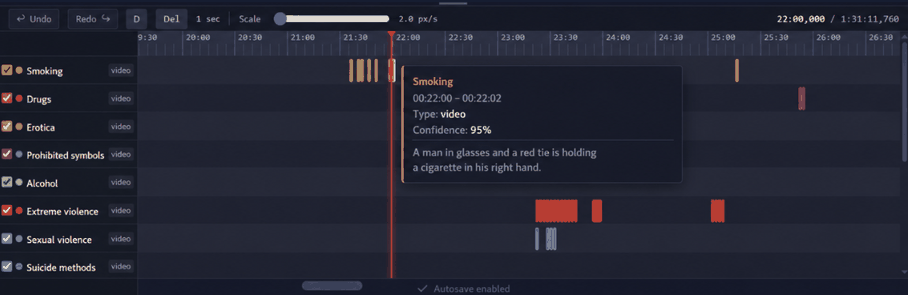
Moderation timeline with a track per category
Each category gets its own track. Click a mark and the player jumps to that second.
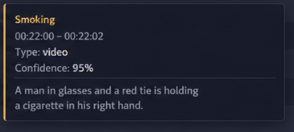
Timecoded evidence for every flag
Category, confidence score and a plain-language description of what was detected.
“A man in glasses and a red tie is holding a cigarette in his right hand.”
Your categories, your threshold
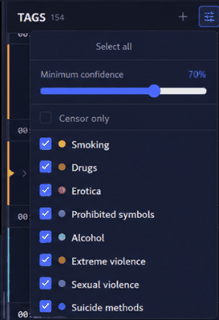
Show what your policy cares about and hide the rest. A kids channel and a late-night film are not reviewed by the same rules. Set the minimum confidence threshold your policy needs.
- Switch categories on and off for each review
- Set the confidence threshold per category
- Filter down to the moments that need censoring
Edit flags on the timeline
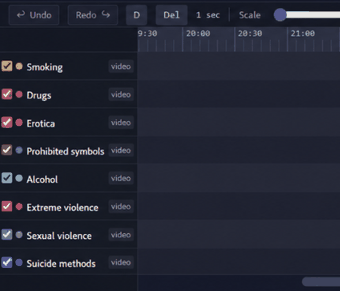
The final call stays with your team. Adjust the boundaries of a flag, confirm it or remove it, and add a moment your policy treats differently. Autosave keeps every change.
Export moderation results: JSON, CSV, Premiere markers
Work in the ViSearch workspace or pull the findings into your own system.
Bulk video moderation for your whole library
Upload videos in bulk and keep them in folders per channel, season or client. Every file gets its own moderation timeline, and search runs across the entire video library at once.
- Batch processing and folders
- Search across the library
- Shareable folder link
- Moderation status per video
Export moderation results to Adobe Premiere
Hand the editor a marked timeline. ViSearch exports the findings as Premiere markers: the editor opens the sequence and every flagged moment is already there, with the category and the reason inside the marker.
Timecoded markers, batch export for a whole folder, and the same data over the API when you want it in your own system.
How to moderate a video in three steps
Add your video
File or link. Nothing to install.
ViSearch runs the moderation
Category, confidence, reason
Your team reviews and decides
Confirm, adjust or remove
Custom moderation profiles for every content type
One video, different rules. Save a moderation profile per content type, market or client: which categories are checked and what confidence threshold each one uses.
Every category has its own confidence threshold: the lower you set it, the more the system shows.Kids and family
Nothing slips through
General audience
The everyday library default
Adult and late-night
Only what really matters here
Profiles are saved and reused, so every moderator on the team works by the same rules.
What ViSearch detects
Detection runs across all categories at once. Every category is included in the price.
Need a category that is not on the list? Custom moderation categories are available for on-premise deployments.
Video moderation for media, platforms and education
Streaming and VOD
Films, episodes and archive titles checked for compliance before distribution.
UGC platforms
Long uploads and stream recordings, before publishing or after a report.
Trust & Safety
Moderate user uploads and stream recordings with the same thresholds across the team.
Online education
Courses and training checked before they go live.
Human-in-the-loop video moderation
AI finds the moments. Your team makes the call.
Context decides what is acceptable, so ViSearch shows the evidence instead of a single confidence score. Moderators also see the flagged seconds of a difficult video, not the whole thing.